WINDOWS 10 / 11 · CHROME · EDGE · BRAVE · 本机运行 WINDOWS 10 / 11 · CHROME · EDGE · BRAVE · RUNS LOCALLY

干卡下载器 GanKa Downloader

接管浏览器的下载,不只是视频。视频、音频、压缩包、文档、安装包统一分段加速与续传;视频的音画在本机无损合并,关掉网页继续下。 It takes over your browser's downloads — not just video. Video, audio, archives, documents and installers all get segmented transfers and resume; video's picture and sound merge losslessly on your machine, and it keeps going after you close the page.

  • Windows 10 / 11Windows 10 / 11
  • Chrome / Edge / BraveChrome / Edge / Brave
  • 无需注册No sign-up
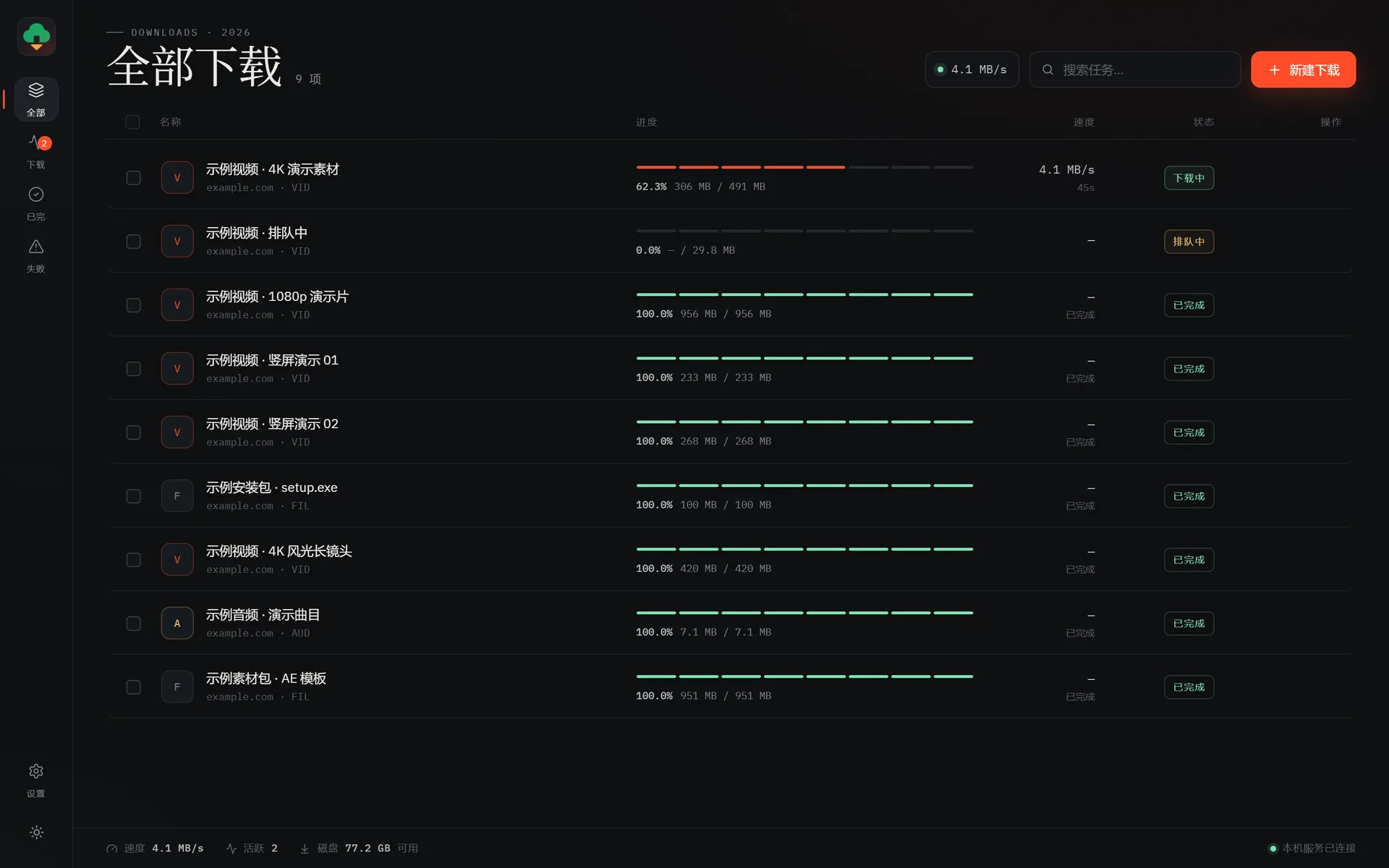
图 01 — 任务队列FIG. 01 — TASK QUEUE CARBON · 1440×900
干卡下载器任务列表:进度、速度与文件大小
真实界面截图,未做美化;任务为演示数据 A real screenshot, not a mock-up; tasks are demo data
同一地址实测MEASURED, SAME URL
345 KB/s3.5 MB/s
分段并发PARALLEL RANGES
8条连接 · 最多 32connections · up to 32
注册、登录、上传记录SIGN-UPS · LOGINS · UPLOADS
0没有账号系统there is no account
01/能力ABILITY

点一下,剩下的交给它 One click. The browser hands it over.

下面八项:各自做什么、怎么做的、差多少。 Eight items: what each one does, how it does it, and by how much.

AHANDOFF

浏览器点一下就接管It takes over in the browser

Chrome / Edge / Brave 里点下载就转给它,下载器没开着会被自动唤醒并等它就绪;接管哪些类型、哪些站点放行,都在设置里改。 A download click in Chrome / Edge / Brave goes to it. If the manager is not running it is woken up and waited for; which file types to take and which sites to leave alone are yours to set.

没开着也能下:自动唤醒并等待就绪WOKEN AND WAITED FOR, EVEN WHEN CLOSED
BSPEED

8 连接分段加速Eight parallel ranges

同一份文件按字节切段并行拉取,默认 8 连接、最多 32。小于 2 MB 的文件自动退回单连接——不为没有收益的切分买单。 The same file is cut into byte ranges and pulled in parallel: 8 by default, up to 32. Files under 2 MB fall back to a single connection — no splitting without a payoff.

实测 345 KB/s → 3.5 MB/sMEASURED 345 KB/s → 3.5 MB/s
CMUX

音画自动合并Audio and video, merged

画面和声音分开给的站点,下完在本机合并:直接搬原始数据,不重新编码,几秒到几十秒完成。 On sites that serve picture and sound separately, they are merged on your machine afterwards — original data copied, never re-encoded. Seconds to a minute.

也可只取音频 · 输出 MP3OR AUDIO ONLY · MP3
DHLS

只给清单也能下Playlists, not files

只暴露 m3u8 的页面:多线程拉分段、丢掉贴片广告、AES-128 本地解密,按顺序拼成整片。 Pages that only expose an m3u8: segments fetched on several threads, interstitial ads dropped, AES-128 decrypted locally and stitched back in order.

初始化片段与广告不当正片INIT & ADS NEVER COUNT AS CONTENT
EAUDIO

只要声音Audio only

单独下音频轨存成 MP3,视频任务也能一键转音频;码率原样保留。 Grab just the audio track as MP3, or convert a finished video task. The bitrate is kept as-is.

原码率 · 不重新编码SAME BITRATE · NO RE-ENCODE
FINTEGRITY

下完还要过验收Finished means verified

断网、关机、取消都能接着下;续传前核对文件标识,服务器换了内容就重下。 Dropped connections, shutdowns and cancels all resume. Before resuming it checks the file identity and downloads again if the server changed it.

提前断流 = 失败,不是完成A CUT-OFF STREAM IS A FAILURE
GCOVERAGE

千站解析 + 嗅探兜底Thousands of sites, plus sniffing

内置解析引擎覆盖数以千计的站点,能带上浏览器登录状态;解析不了,就用正在播的那条真实地址。 The built-in parser covers thousands of sites and reuses your browser login. When it fails, the stream that is actually playing is used instead.

两条路径,同一份产物TWO PATHS, ONE RESULT
HTYPES

不止视频:什么都能接Not just video: anything the browser sends

接管规则按类型、站点、关键词三处配。压缩包、文档、光盘镜像、安装包、模型权重都在默认清单里;不想接的站点加进排除列表就行。 Rules work by type, site and keyword. Archives, documents, disk images, installers and model weights are all on the default list; add a site to the exclude list and it is left alone.

类型 · 站点 · 关键词,三处都能改TYPES, SITES, KEYWORDS — ALL EDITABLE
02/原理PRINCIPLE

它凭什么下得完 Why it actually finishes

下载器出问题,多数不是"下得慢",是"以为下完了"。所以整条链路里有三步是为"完整"服务的。 Most download failures are not slow downloads — they are completed downloads that are not complete. Three steps in the pipeline exist to prevent exactly that.

  1. STEP 01

    找到真正在播的那条Find the stream that is playing

    页面里可能同时有预加载的下一集、贴片广告和背景音乐。它只认主播放器正在请求的那一条;解析不出来时,直接抓播放器自己发出的请求——哪怕页面地址是 blob。 A page may carry the next episode preloading, an ad and background music at once. It only trusts what the main player is requesting right now; when parsing fails it taps the player's own requests — even when the address is a blob.

  2. STEP 02

    切成段,分开拉Cut it up, pull it in parallel

    直链按字节切 8 段;m3u8 交给 HLS 引擎逐段拉;页面 URL 先解析成直链再分段。下载跑在独立进程里,关掉浏览器也继续。 Direct files are split into 8 byte ranges; m3u8 playlists go through the HLS engine segment by segment; page URLs are resolved to direct links first. Downloads run in a separate process, so closing the browser changes nothing.

  3. STEP 03

    合起来,然后验收Merge, then verify

    画面与声音各下各的,再在本机无损合并;成品要过大小、时长、音轨三项检查。缺一样都不算完成——宁可报错,让你重试。 Picture and sound download separately, then merge losslessly on your machine. The result must pass size, duration and audio-track checks. Missing one means failure — a clear error, so you can retry.

01 浏览器Browser 你点下载的地方WHERE YOU CLICK
02 扩展Extension 嗅探 + 接管SNIFF & HANDOFF
03 本机下载器Local manager 127.0.0.1:47653
04 文件Your file 落到你的目录IN YOUR FOLDER

↑ 全流程不出本机:没有中转服务器、没有账号、没有统计上报。 ↑ THE WHOLE PATH STAYS ON YOUR MACHINE — NO RELAY, NO ACCOUNT, NO TELEMETRY.

03/界面SCREENS

每一步都看得见 Every step is visible

三张截图,按实际使用的顺序:网页里选清晰度,管理器接手,任务在列表里跑完。要做的判断都在点下去之前。任务都是演示数据,点开可以看大图。 Three screenshots in the order you actually use them: quality in the page, the manager takes over, the task runs to the end in the list. Every decision happens before you click. The tasks are demo data; click any image to enlarge.

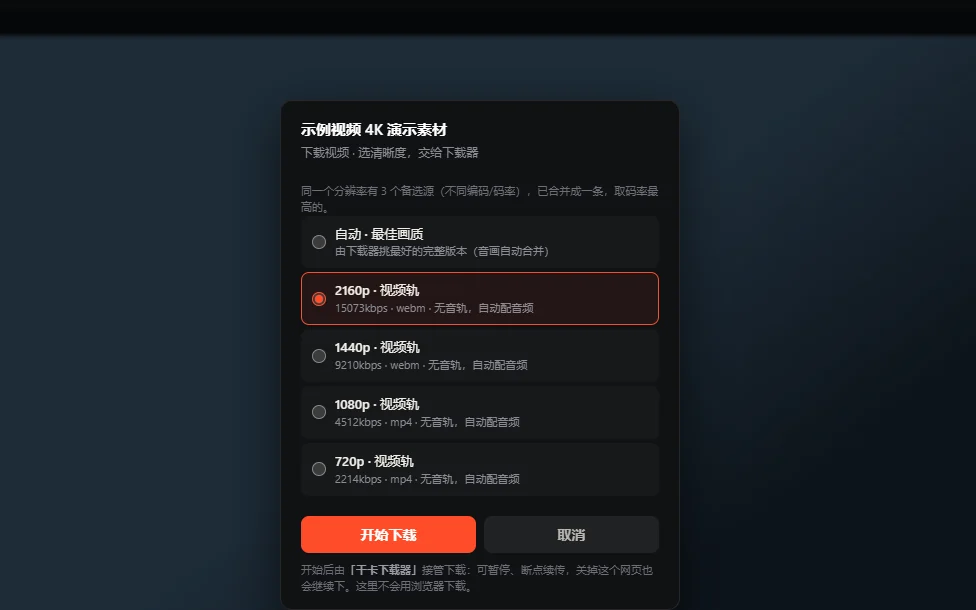
网页里的清晰度面板:每行写分辨率、码率与格式,选好再点开始下载
01 — 清晰度面板QUALITY PANEL

先定清晰度再下载Pick the quality first

每行先写分辨率,后面跟码率与格式;选好再点「开始下载」,糊不糊下载前就知道。同一分辨率有多个源时取码率最高的那条。Each row states the resolution, then its bitrate and format; pick one and press Start download. You know it is sharp before the bytes move. When one resolution has several sources, the highest bitrate is taken.

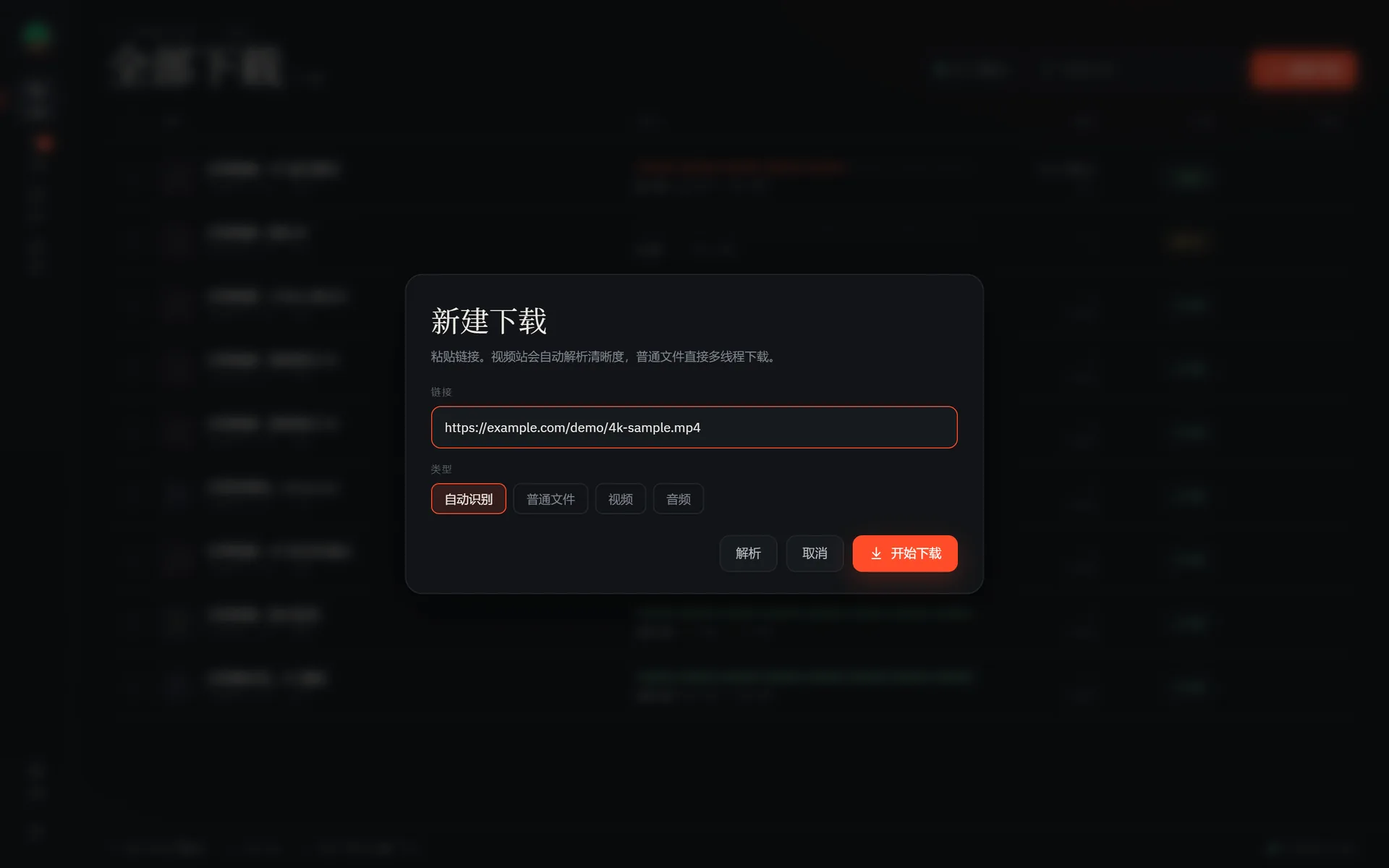
新建下载窗口:粘贴链接后自动识别视频或普通文件,并选择保存位置
02 — 新建下载NEW DOWNLOAD

直链也走这里Direct links work here too

不止网页里的视频:把链接粘进「新建下载」,视频先解析清晰度,普通文件直接分段,默认 8 连接、最多 32。类型也能手动改。Not just the video on the page. Paste a link into New download: video is parsed for quality, ordinary files go straight to segmented transfer — 8 connections by default, up to 32. Override the type if you want.

任务列表:进度、速度、剩余时间与阶段都在同一行里
03 — 任务列表TASK LIST

一行里看全程The whole run, in one row

进度、速度、剩余时间、阶段都在行内;关掉网页照样下。收尾阶段单独写「合并音画中 97.2%」,不把合成算成 100%。Progress, speed, time left and phase sit in the task row. Close the page and it keeps going. While the two tracks are muxed the row reads “Muxing audio 97.2%”, never 100%.

04/底线HONESTY

宁可报错,
也不给你一个打不开的文件
Better an error
than a file that will not open

下载器最容易骗人的地方不是失败,是"显示已完成"。下面这几条判断写在引擎里,触发时会丢掉已经下的部分并说明原因。 What a downloader lies about is not failure — it is “completed”. These rules live in the engine; when one triggers, the partial file is discarded and the reason is stated.

  • R1

    只下到试看片段A preview, not the film

    产物短于原片时长的 70%,判定为试看/预告,丢掉残片,并告诉你正片多长、为什么只给了这一段。An output shorter than 70% of the real duration is a preview: the partial file is discarded and you are told how long the real thing is and why only a slice was served.

    <70%
  • R2

    下到的是伪装分片A disguised fragment

    视频成品小于 256 KB,判定为分片或初始化片段,删掉文件并报错——页面上的名字可以伪装,服务器给的大小不会。A “video” under 256 KB is a segment or init chunk: the file is deleted and an error is raised. Names can be disguised; the byte count cannot.

    <256 KB
  • R3

    两轨长度对不上Tracks of different lengths

    视频与音轨差超过 25%,拒绝合并。否则「按最短的一条合并」会把正片悄悄裁短,而文件看起来完全正常。If picture and sound differ by more than 25%, they are not merged. Otherwise “follow the shortest track” quietly trims the film while the file still looks fine.

    >25%
  • R4

    直播拉流A live pull

    服务器不给总大小、字节一直来,直接拒收。它永远不会下完,留着只会多一条"一直在下载"的任务。No total size, bytes arriving forever: refused outright. It would never finish, leaving a task that downloads indefinitely.

    ∞
  • R5

    DRM 加密DRM

    识别到加密就提前标锁,在你点下载之前就说明不支持,而不是下完给你一个花屏文件。Encryption is flagged before you click: unsupported is stated up front, not discovered as a corrupted file afterwards.

    DRM
DEFINITION

完成的定义是:双击能打开、音画都在、时长对得上。 Finished means: it opens, the sound is there, the duration matches.

05/对比COMPARE

和浏览器自带的下载比 Against the browser's own downloader

浏览器自带的下载器够用,但它只负责"把字节收下来"。下面这些差别,恰好是"收下来"和"能看"之间的距离。 The built-in downloader is fine at collecting bytes. The gap between “collected” and “watchable” is exactly where these differences sit.

← 左右滑动查看完整对比 →← SWIPE TO SEE THE FULL TABLE →

能力Capability 浏览器自带Built-in 干卡下载器GanKa
单文件多连接分段Multiple connections per file — ✓ ×8
音画分开时自动合并Merge split audio & video — ✓
m3u8 清单直接下成整片Playlists into one file — ✓
关掉浏览器继续下载Keeps going after the browser closes — ✓
断点续传Resume interrupted downloads ✓ ✓ +校验verify
分片 / 试看片段校验Fragment & preview detection — ✓
队列、限速、托盘常驻Queue, speed limit, tray ~ ✓
把下载交给独立的下载管理器Hands downloads to a real manager — ✓
保存位置、排除站点可配Save location and per-site rules ~ ✓

「浏览器自带」指 Chrome / Edge 的默认下载,不同版本可能略有差别。 “BUILT-IN” MEANS CHROME / EDGE DEFAULT DOWNLOADS; BEHAVIOUR VARIES BY VERSION.

06/问答FAQ

先把话说清楚 Straight answers

不需要注册账号,也不需要登录。装上就能免费用 15 天,15 天后输入激活码继续使用(¥30 / US$5,一机一码,买断)。No account and no login. The app is free for 15 days; after that you enter a licence key to keep creating downloads (US$5, one licence per PC, one-time purchase).

不会。解析与下载都在本机完成,不经过中转服务器,也没有统计上报。它只连你要下的那个地址。No. Parsing and downloading happen on your machine with no relay server and no telemetry. The only network traffic is the file you asked for.

内置解析引擎覆盖数以千计的站点,会带上浏览器的登录状态;解析不出来时,用浏览器里正在播的真实地址兜底。DRM 加密的会员片源、7×24 直播不支持,遇到会直接说明原因。The built-in parser covers thousands of sites and reuses your browser session. If it cannot parse a page, the stream the browser is actually playing is used instead. DRM-protected member content and 24/7 live streams are not supported, and the app says so.

多半是页面只给了试看片段(课程、付费内容常见),或者点到了页面里预加载的另一条视频。它会丢掉残片、说明原因和正片时长,而不是留一个打不开的文件。Usually the page only served a preview (common with courses and paid content), or the click landed on another video the page was preloading. The partial file is discarded and you get the reason and the real duration, not an unopenable file.

不需要。下载跑在独立的管理器进程里,关掉网页、关掉窗口都继续;从托盘随时叫回来。No. Downloads run in the manager process: close the tab, close the window, they continue. Call it back from the tray when you need it.

目前只有 Windows 10 / 11(64 位)桌面版。没有做别的平台,页面和安装包上也不会假装支持。Windows 10 / 11 (64-bit) desktop only. Nothing else is claimed here or in the installer.

不会。卸载只移除程序本身;下载的文件留在你选的目录里,设置与任务记录也可以自己删。No. Uninstalling removes the program only. Downloads stay in the folders you chose; settings and task history are yours to delete.

不是。凡是浏览器发起的下载都能接:压缩包、文档、光盘镜像、安装包、模型权重……视频只是其中一类;音画合并、m3u8 整片下载这些是专门为视频加的。No. Anything the browser starts can be taken over: archives, documents, disk images, installers, model weights. Video is just one category — merging picture and sound, and turning m3u8 playlists into one file, are video-specific extras.

默认排除 Windows 更新这类系统域名;类型、站点、关键词三处都能排除,也能一键关掉接管。System hosts such as Windows Update are excluded by default. You can exclude by type, site or keyword, and turn handoff off entirely.

没答到?写封邮件:STILL STUCK? EMAIL — [email protected]

WINDOWS 10 / 11 · 64-BIT

下载并安装 Download and install

一个安装包,装完按向导提示在浏览器加载扩展就能用。升级直接覆盖安装,设置和任务都保留。 One installer. Load the extension when the wizard tells you to, and you are done. Upgrades install over the top and keep your settings and tasks.

¥30$5 ≈ US$5 ≈ ¥30 单机授权 · 一机一码 · 买断含 1 年更新 One machine · one code · perpetual, 1 year of updates

购买授权Buy a licence
下载 Windows 版Download for Windows v0.1.8 · 115 MB
版本VERSION
0.1.8
体积SIZE
115 MB
系统SYSTEM
Win 10 / 11 ×64
浏览器BROWSERS
Chrome · Edge · Brave
INSTALL / 3 STEPS
  1. 01
    运行安装包Run the installer

    双击下载到的 GanKa_Setup.exe,按向导完成安装。Open the downloaded GanKa_Setup.exe and follow the wizard.

  2. 02
    在浏览器加载扩展Load the extension

    安装目录里有一份图文说明;在 Chrome / Edge / Brave 的扩展页「加载已解压的扩展程序」。A short guide ships in the install folder; use “Load unpacked” on your browser's extensions page.

  3. 03
    随便下点什么Download something, anything

    在网页里点下载,或从右下角面板选清晰度 → 开始下载;之后交给管理器,关掉网页也在下。Click a download in the page, or use the bottom panel to pick a quality. It hands off to the manager and keeps running with the page closed.

SHA-256 6f45e83c7b9243b20bce87604323c74c458e2dcd96b1d1c45ebd0150e03cdd61

安装包离线安装,无捆绑。 OFFLINE INSTALLER, NO BUNDLED EXTRAS.

v0.1.8 · 2026-11-23 更新:修复「下载新版」跳浏览器——设置里的更新按钮现在和任务页提示条一样,在软件自己的窗口里显示下载进度,下完自动打开安装程序(点下一步即可覆盖安装,设置与任务都在)。完整改动见价格与条款。 v0.1.8 · 2026-11-23 UPDATE: "Download update" no longer opens the browser. The button in Settings now shows progress inside the app and launches the installer when done - click Next to upgrade; your settings and tasks are kept. Full notes in PRICING & TERMS.